

Google Maps – One app to solve everything!
Although before usApps needed for driving in the USThe article introduces how different apps can help you have a smooth and cost-effective car rental trip in the United States. However, some people may not like having multiple apps installed on their phones. Therefore, this article will introduce how Google Maps can solve your driving needs in the United States at different levels, including navigation, real-time traffic conditions, gas price comparison, parking, rest stop planning, and even the presence of police ahead!
However, many of these features are only available in the United States, and their full potential may not be apparent in other countries. For locals, Google Maps is often sufficient for long road trips, as it is not only free and available in Chinese, but also has a very familiar interface for overseas travelers.
I. App Navigation Function: Intelligent Judgment + Offline Map
Google Maps navigation is renowned for its accuracy and real-time updates. Its greatest strength lies in its ability to automatically adjust to the fastest route based on traffic conditions ahead, providing real-time voice prompts. This is especially crucial in the complex interchange systems of the United States, where exits can be on the left or right. Google Maps will inform you in advance which interchange to take or which lane to stay in. Even if you take the wrong turn, Google Maps will immediately correct you and provide a new route.
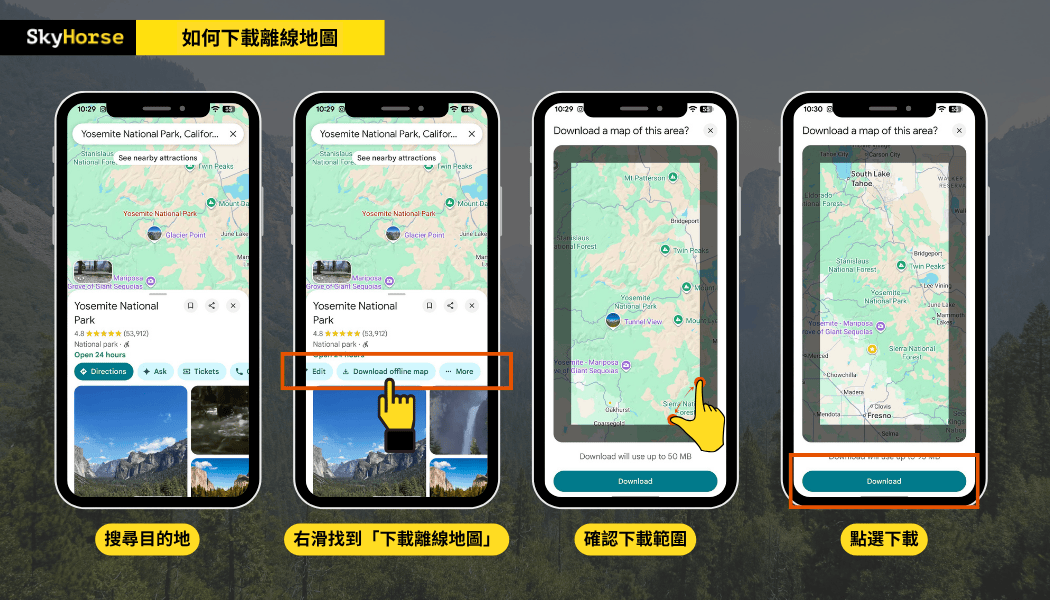
If you are traveling to national parks or desert areas where the internet signal is unstable, remember to download offline maps first. Even if there is no internet for a short period of time, you can still navigate and search for locations, which is very useful for travelers on long trips in the United States.
The procedure is as follows, using Yosemite National Park as an example:
🚧Friendly Reminder: Even though Google Maps navigation is quite accurate, it's still recommended that travelers familiarize themselves with the route before departure, including the direction of their journey and which roads they will be taking, especially paying attention to lane change systems on long trips. Additionally, Google Maps may sometimes be unclear about local traffic conditions; drivers still need to rely on common sense and the specific circumstances, such as whether it's safe to turn at an intersection, the appropriate time to change lanes, whether the road is too steep or narrow, and whether it's a one-way street, etc.
II. Selectable Road Mode: Avoid Highways and Toll Roads
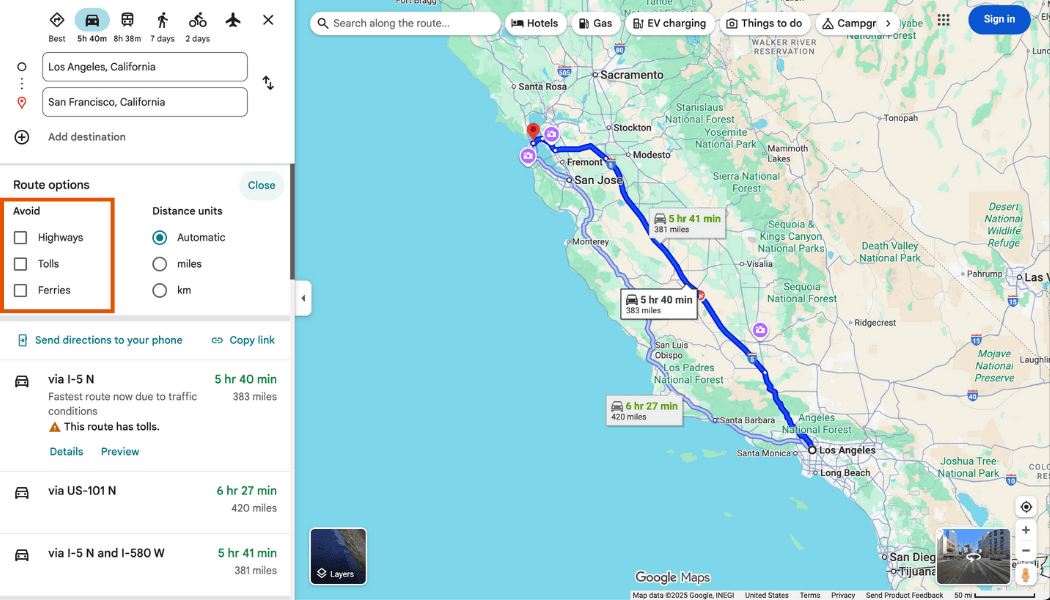
This is a very thoughtful design in the app because every driver has their own preferences. Some people like to take highways, while others prefer to drive slowly; some are bothered by toll fees, while others want to avoid certain areas. Therefore, when choosing a route in Google Maps navigation, you can adjust whether to avoid highways or toll roads, whether to choose the fastest route, or another route, which is very convenient for drivers with preferences.
🚧Friendly reminder: After choosing to avoid certain roads, it is recommended to double-check the detour time and route. Some sections may require a long detour or driving on roads with poorer conditions if you do not take toll roads or highways.
Third, it solves the problem of finding gas stations and allows you to compare gas prices.
When driving in the US, gas prices can vary greatly from region to region. Google Maps lets you type "gas station" into your navigation to see the brands, prices, opening hours, and reviews of gas stations along your route. Users also upload the latest gas price information, allowing you to compare prices instantly and easily choose the most cost-effective gas station. For more precise price comparisons, you can also refer to another app we've introduced: GasBuddy.
🚧Friendly Reminder: You don't need to end navigation. Simply select "Search for places along the way" on the navigation screen, enter "gas", confirm the gas station you want to go to, and a new stop will be added directly to the route. Google Maps will recalculate the distance and time. If your car has a CarPlay system, you can also use voice search.
IV. Parking in the city is extremely difficult? Parking lot search, pricing information, online booking
Finding parking in American cities is often a nightmare for road travelers, but Google Maps can help you find parking more smoothly and efficiently.
After entering your destination, select "Nearby" → "Parking" to view parking lot locations, pricing ranges, opening hours, and reviews, as well as the walking distance to your destination. Some areas even offer options for "Reservation Available" and "Instant Availability," which is especially convenient at popular tourist attractions.
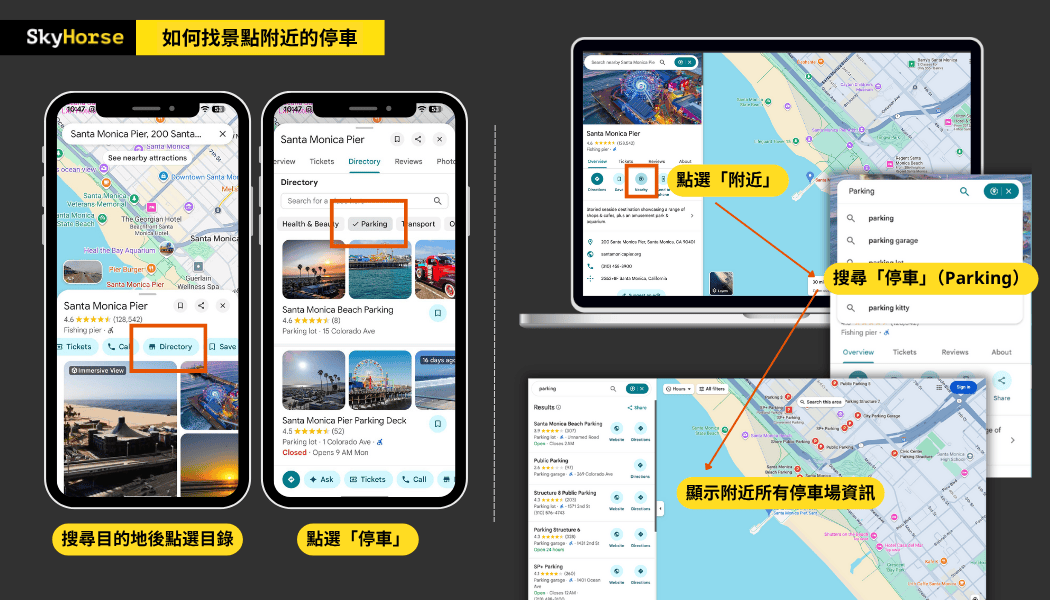
If you need to reserve a parking space in advance, or watch a game or show, it is recommended to use [the app/service name]. SpotHero By reserving a parking space, you can sometimes enjoy discounts at specific partner parking lots.
- How to park safely and legally, and how to pay the fees? Please refer to the following:Parking Tips in the U.S.
5. Check all the rest stops, restaurants, and attractions along the way in one go!
Long-distance driving requires not only navigation but also timely rest and resupply, but having to exit the route and search again every time is very troublesome. Google Maps' "Explore" and "Search along the way" features can help you quickly find rest stops, restaurants, cafes, and viewpoints along the way, while also letting you know how much extra time it will take to get to these locations.
Simply enter keywords like "rest area," "coffee," or "viewpoint" into your navigation app to see recommended locations along your route. Each location also includes photos, reviews, and opening hours from Google users, making it easy to find a place worth stopping for a short break.
Extended Reading:A must-read for long-distance self-drive trips in the US!
VI. Real-time traffic conditions and "Police Ahead" alerts
Many travelers have asked us if there are any apps in the US similar to "Aegis" that alert drivers to "speed cameras ahead." In fact, there are relatively few speed cameras in the US, but police officers who conduct speed checks on the roadside are unpredictable. Therefore, Google Maps' police alert feature is a real boon for drivers!
In recent years, Google Maps has integrated a "user report" feature similar to Waze, which allows users to see in real time whether there are police, construction, accidents, or traffic jams ahead. It provides alerts before arrival and asks the driver, "Is this situation still present?" Through a large amount of driver report data, it provides the latest traffic reports.
This feature is especially useful on highways:
- When you see the "Slow-moving traffic ahead" warning, you can slow down or change lanes in advance.
- The "Police Report" message can remind drivers to adhere to speed limits.
- In case of road closures or traffic accidents, Google Maps usually automatically replans alternative routes.
However, you should never let such reminders make you feel safe to speed; you should still drive safely within the speed limit. The speed limit on US highways is between 60 and 80 miles per hour (mph), with a common unwritten rule of a 10 mph grace period. However, exceeding the speed limit by even 1 mph may still be considered speeding, and the fine will be determined based on the speed measured by the police at the time.
7. Share your real-time location for easier travel with fellow travelers in multiple vehicles.
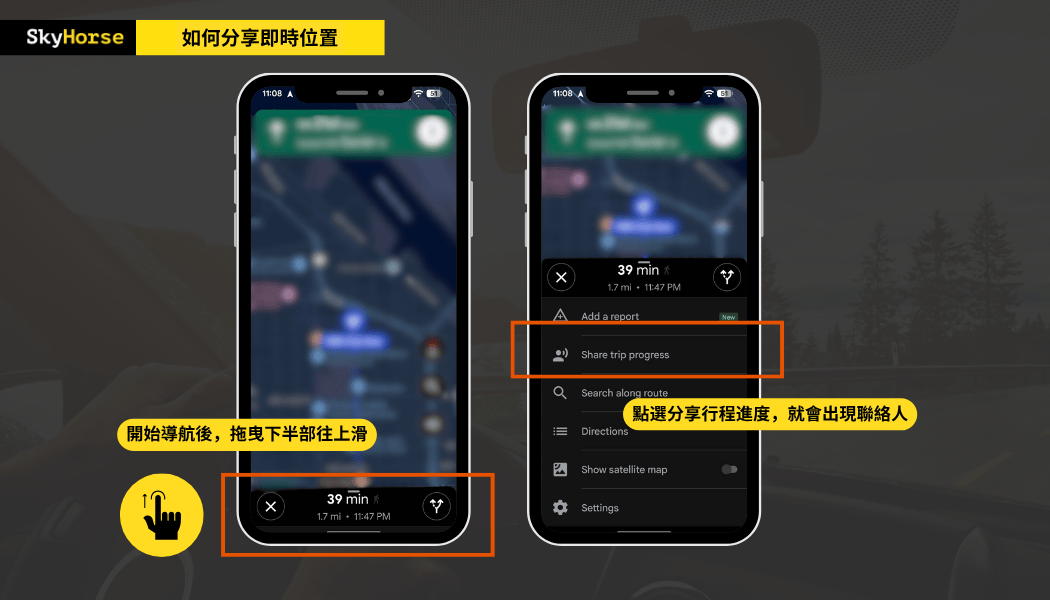
Google Maps now has a new feature – "Share trip progress," which allows you to share your real-time location with family and friends, whether you're walking or driving. Once enabled, everyone can see each other's current location and estimated arrival time. When traveling together, you don't have to struggle to keep up with the car or worry about getting separated. This feature is incredibly practical and reassuring for family trips or group tours with two or more cars.
Google Maps combined with in-vehicle equipment provides greater stability and safety.
Google Maps is more versatile and convenient than you might imagine, isn't it? However, driving while looking at your phone is difficult and unsafe. If the passenger is using their phone to give directions, errors are likely, and it requires a lot of concentration. Therefore, when choosing a rental car, it's best to rent one equipped with CarPlay.
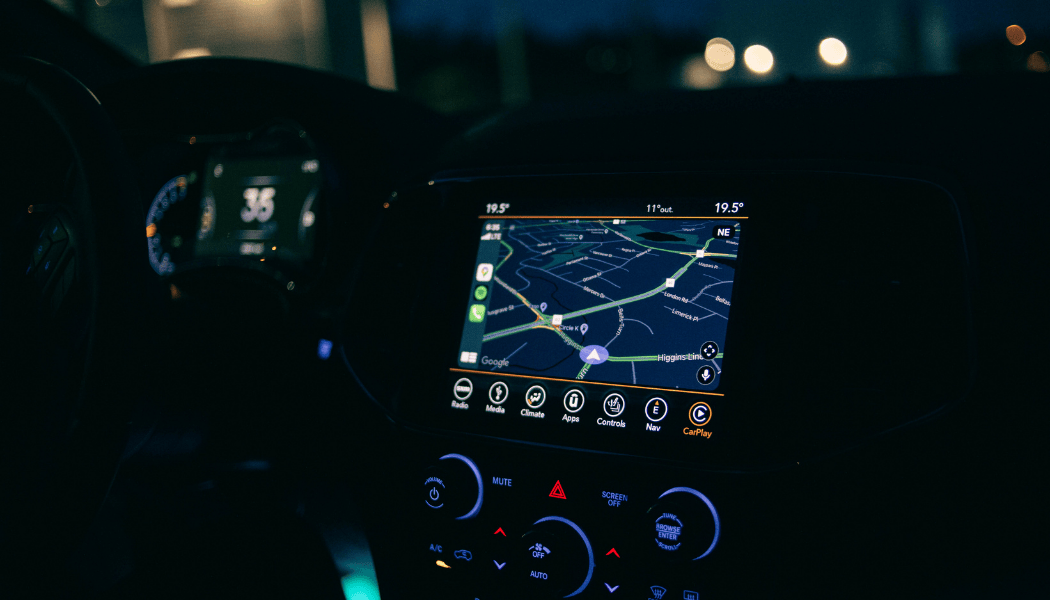
Except for special models, almost every Sky Horse vehicle is equipped with CarPlay. Whether it's an iPhone or an Android phone, as long as you bring your own cable, you can easily use Google Maps in the car, making driving easier and providing peace of mind for your travel companions.
If you have any questions, please feel free to ask.Get to know directly via LINE!

